The 5 Best Free DrawSQL Alternatives in 2026 (No Table Limits)
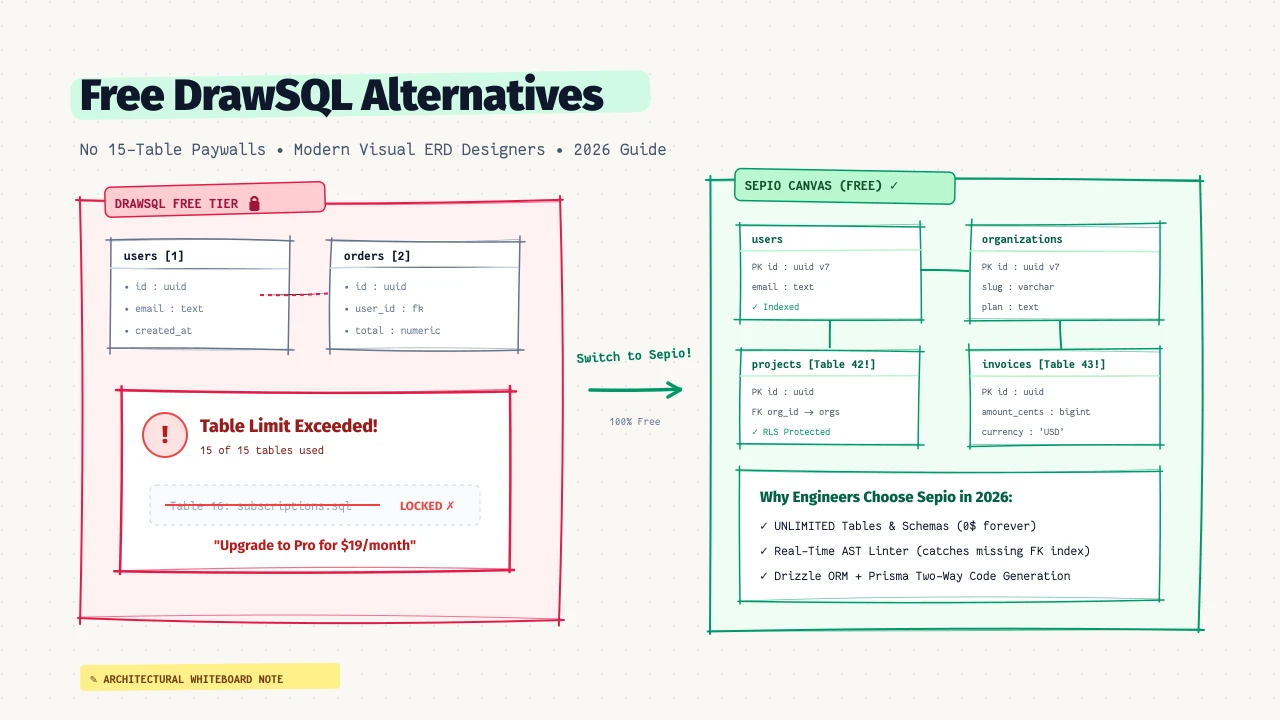
The 15-Table Problem in Modern Database Design
If you have ever used DrawSQL to design a greenfield project, you are probably familiar with this exact sequence:
- You create an account, open a fresh canvas, and begin sketching tables:
users,teams,roles,permissions,sessions,accounts. - Next, you map your core domain models:
projects,documents,comments,tags,attachments,activities. - You reach for your 16th table—perhaps
subscriptionsoraudit_logs—and your browser suddenly freezes with a modal:
“You’ve reached the free plan limit of 15 tables. Upgrade to Pro for $19/month to continue.”
“A database diagramming tool that caps you at 15 tables isn’t a design workspace; it’s a paywall countdown timer. Real production schemas have 30 to 80 tables before your MVP even launches.” — Backend Lead at Y Combinator S24 Startup
In 2026, even a modest SaaS boilerplate with authentication, payments, and multi-tenancy exceeds 15 tables on day one. For freelance engineers, indie hackers, and startup teams, paying $19 to $49 every single month just to view or modify an architectural diagram feels completely detached from modern open-source tool economics.
Fortunately, several modern, free, and open-source alternatives have emerged. Here is the definitive breakdown of the best free DrawSQL alternatives in 2026.
1. Sepio (Best Overall for Modern TypeScript & SQL Stacks)
License: Free & Unlimited (Cloud + Local-First PWA)
Best For: Developers using TypeScript, Drizzle ORM, Prisma, PostgreSQL, or MySQL who want an interactive, Figma-like canvas with zero artificial restrictions.
Sepio was built specifically to eliminate the table caps and outdated generation pipelines found in legacy ERD editors.
Why It’s the Top DrawSQL Alternative:
- Unlimited Tables & Free Diagrams: There are no artificial limits on tables, fields, or diagrams. You can design 500-table enterprise architectures with zero cost.
- Local-First & Zero Sign-Up: You can open app.sepio.dev and immediately start drawing. Your schemas are persisted locally in your browser using IndexedDB. No mandatory login, no tracking, and 100% offline support.
- Real-Time AST Schema Linter: While DrawSQL acts as a passive drawing board, Sepio features an active schema compiler. It automatically catches missing primary keys, unindexed foreign keys, circular cascade loops, and dialect-specific type violations directly on the canvas.
- Bidirectional Drizzle ORM & Prisma Engine: Dragging relation lines automatically updates idiomatic TypeScript code with
.references()or@relationtags, and pasting existing code instantly renders the visual graph.
-- Sepio dialect-aware export (Clean PostgreSQL DDL)
CREATE TABLE users (
  id UUID PRIMARY KEY DEFAULT gen_random_uuid(),
  email VARCHAR(255) NOT NULL UNIQUE,
  created_at TIMESTAMPTZ NOT NULL DEFAULT NOW()
);

CREATE TABLE orders (
  id UUID PRIMARY KEY DEFAULT gen_random_uuid(),
  user_id UUID NOT NULL REFERENCES users(id) ON DELETE CASCADE,
  total_amount NUMERIC(12, 2) NOT NULL CHECK (total_amount >= 0),
  created_at TIMESTAMPTZ NOT NULL DEFAULT NOW()
);

-- Sepio automatically flags missing FK indexes:
CREATE INDEX idx_orders_user_id ON orders(user_id);
2. DrawDB (Best for Pure Open-Source Offline Use)
License: Open Source (MIT)
Best For: Developers who want a self-hostable, web-based visual canvas without any cloud backend.
DrawDB gained massive traction on GitHub as a community-driven response to DrawSQL’s pricing.
Pros:
- Completely free and open-source under the MIT license.
- Clean visual interface that closely mimics DrawSQL’s spatial canvas.
- Native browser storage with JSON import and export.
- Supports PostgreSQL, MySQL, SQLite, and MariaDB.
Cons:
- Lacks real-time multiplayer collaboration (no live cursors or concurrent team editing).
- No schema linting engine (it won’t alert you to invalid foreign key data types or unindexed columns).
- Code generation is limited to standard raw SQL DDL (no TypeScript ORMs like Drizzle or Prisma).
3. ChartDB (Best for Instant Live Database Reverse Engineering)
License: Open Source / Free
Best For: Engineers who want to visualize an already existing database by running a query or pasting a connection string.
While DrawSQL requires you to manually draw tables or paste CREATE TABLE scripts, ChartDB specializes in reverse-engineering live production schemas.
Pros:
- Provides a single read-only SQL query you can run against PostgreSQL, MySQL, or SQL Server to extract metadata.
- Automatically generates an interactive visual layout from the returned JSON metadata.
- Clean, dark-mode visual interface with zoomable pan controls.
Cons:
- Better for visualizing existing architectures than designing greenfield schemas from scratch.
- Manual table creation and relationship editing can feel more rigid compared to freeform canvas tools.
- Export options focus primarily on query scripts rather than modern application ORM definitions.
4. DBeaver / DataGrip (Best for Desktop Database Administration)
License: DBeaver (Open Source Community Edition) / DataGrip (Paid JetBrains Subscription)
Best For: Database administrators and backend developers who need deep query debugging, table inspection, and ER diagrams inside an IDE.
If you don’t need a browser-based tool or shareable web links, desktop database clients like DBeaver have built-in Entity-Relationship visualizers.
Pros:
- Deeply integrated into your actual database connection: clicking a table lets you inspect actual row data and run
EXPLAIN ANALYZE. - Auto-generates relationship diagrams directly from database foreign key catalogs.
- 100% private and runs locally on your workstation.
Cons:
- Heavy Java/Electron desktop applications that consume gigabytes of memory.
- Diagrams are rigid and auto-arranged; you cannot easily drag, customize colors, or annotate tables for design reviews.
- Sharing a diagram requires taking screenshots or exporting clunky PDFs—there is no interactive link sharing for product managers or frontend teammates.
5. QuickDBD (Quick Database Diagrams)
License: Freemium (Free up to 10 tables)
Best For: Developers who prefer rapid keyboard typing over drag-and-drop mouse interfaces.
QuickDBD takes a text-first approach similar to dbdiagram.io, using a proprietary indented shorthand to declare tables and relationships.
# QuickDBD Syntax Example
Customers
-
CustomerID PK int
Name string
Email string

Orders
-
OrderID PK int
CustomerID int FK >- Customers.CustomerID
TotalAmount decimal
Pros:
- Extremely fast keyboard entry for developers who dislike visual drag-and-drop.
- Auto-arranges tables as you type.
Cons:
- The free plan is even more restrictive than DrawSQL (capped at only 10 tables).
- Relies on a proprietary text syntax rather than open standards like DBML or TypeScript.
Feature Comparison Matrix
| Capability | Sepio | DrawSQL | DrawDB | ChartDB | DBeaver |
|---|---|---|---|---|---|
| Price | 100% Free | $19–$49/mo | 100% Free | Free / Open | Free (Community) |
| Free Table Limit | Unlimited | 15 tables | Unlimited | Unlimited | Unlimited |
| Canvas UX | Figma-like Drag & Drop | Drag & Drop | Drag & Drop | Interactive Graph | Auto-generated grid |
| Schema Linter | Yes (Real-Time AST) | No | No | No | No |
| TypeScript / Drizzle Export | Native Two-Way | No | No | No | No |
| Prisma ORM Export | Yes | No | No | No | No |
| Local-First / PWA Offline | Yes (IndexedDB) | No (Cloud only) | Yes | Yes | Yes (Desktop) |
| Cloud Multiplayer | Yes (Live Cursors) | Paid only | No | No | No |
How to Migrate from DrawSQL to Sepio in 2 Minutes
If you already have existing diagrams trapped behind DrawSQL’s table limit, you can migrate them into Sepio immediately with zero data loss:
- In DrawSQL, click Export and choose SQL Script (PostgreSQL or MySQL).
- Open app.sepio.dev.
- Click Import in the top navigation and select SQL DDL.
- Paste your DrawSQL SQL output and click Generate Schema.
Sepio will parse your tables, automatically align foreign keys, run the AST diagnostic linter, and render an interactive canvas with unlimited tables.
Frequently Asked Questions
Why does DrawSQL enforce a 15-table limit?
DrawSQL’s free tier is designed as a sales funnel. Because almost every real application exceeds 15 tables during development, the limit forces users onto their paid subscription tiers ($19/mo for Hobbyist, $49/mo for Teams).
What is the best completely free alternative to DrawSQL?
For modern developers, Sepio is the best all-around alternative because it combines a visual drag-and-drop canvas, unlimited tables, real-time AST linting, local-first offline PWA mode, and bidirectional Drizzle/Prisma code generation. If you prefer a pure local-storage open-source tool without cloud options, DrawDB is another great choice.
Can I share my database diagrams with teammates without paying?
Yes. With Sepio, you can export your diagram as high-resolution SVG or PNG, export your schema as DBML or SQL, or share live collaborative project links without hitting paywalls.