The Production RBAC Database Schema: Complete PostgreSQL & Drizzle ORM Blueprint
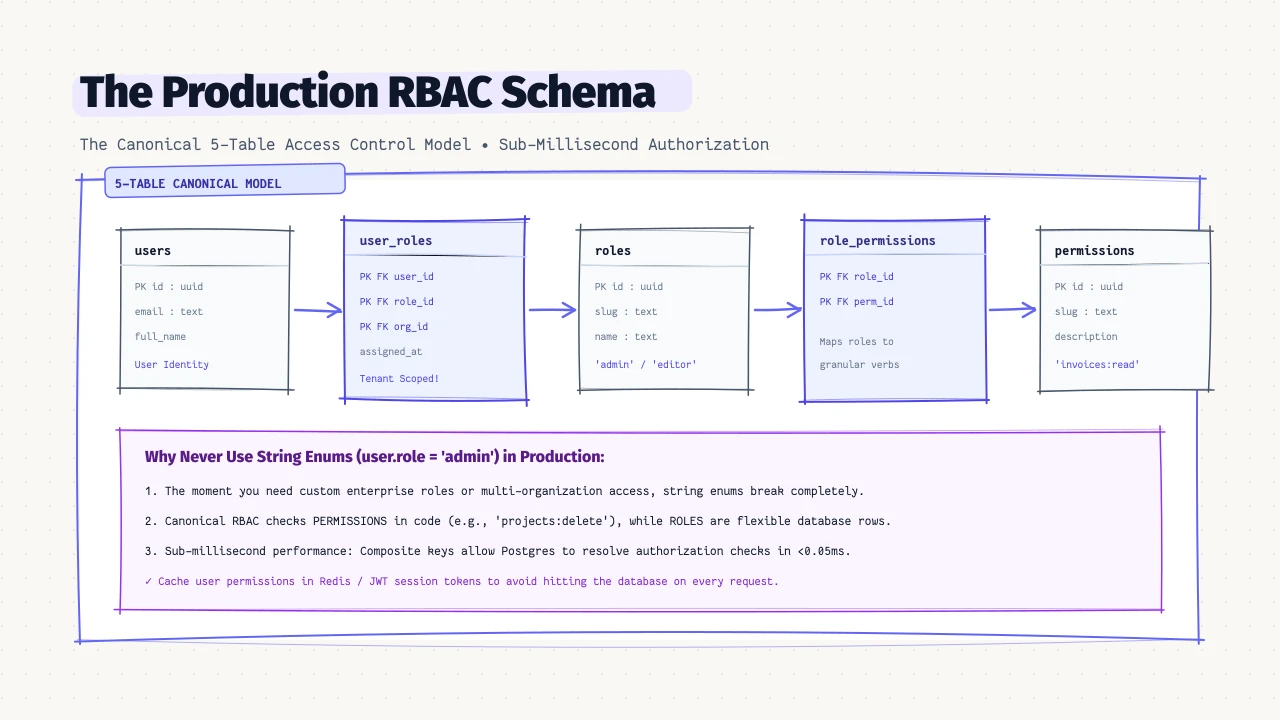
Why Single-Column Roles Fail at Scale
Nearly every web application begins its authorization system with a single string column:
-- The Rookie Mistake:
ALTER TABLE users ADD COLUMN role VARCHAR(32) DEFAULT 'member';
In your application code, you write simple checks:
if (user.role === 'admin') {
  allowAccess();
}
This works delightfully for about three months. Then the business expands, and real-world enterprise requirements land in your backlog:
- “We need an ‘editor’ who can create documents but not delete them.”
- “Our enterprise client wants to create custom roles for their legal auditors.”
- “A user should be an ‘Admin’ in Workspace A, but only a ‘Viewer’ in Workspace B.”
- “Can we temporarily grant billing access to an external contractor without giving them admin rights?”
At this point, hardcoded string roles collapse into an unmaintainable nightmare of nested if/else checks, database migrations, and brittle permissions drift.
“Roles should never be hardcoded into application business logic. Roles are merely named collections of granular permissions. Your application code checks permissions; your database models roles.” — Staff Security Architect at Enterprise Identity Provider
To build a resilient system that never requires database rewrites, you must adopt the Canonical 5-Table RBAC (Role-Based Access Control) Model.
The Canonical 5-Table RBAC Model
The industry standard for relational access control divides responsibilities across five distinct tables:
erDiagram
    USERS ||--o{ USER_ROLES : "assigned"
    ROLES ||--o{ USER_ROLES : "assigned to"
    ROLES ||--o{ ROLE_PERMISSIONS : "contains"
    PERMISSIONS ||--o{ ROLE_PERMISSIONS : "grouped in"

    USERS {
        uuid id PK
        string email
        string full_name
    }

    USER_ROLES {
        uuid user_id FK
        uuid role_id FK
        uuid organization_id FK
        timestamp assigned_at
    }

    ROLES {
        uuid id PK
        string slug
        string name
        boolean is_system
    }

    ROLE_PERMISSIONS {
        uuid role_id FK
        uuid permission_id FK
    }

    PERMISSIONS {
        uuid id PK
        string slug
        string description
    }
Core Entities:
users: The individual actor authenticating into the system.roles: Named bundles of capability (admin,editor,billing_manager,auditor).permissions: Atomic, granular actions defined by your system (projects:create,invoices:read,team:invite,billing:manage).role_permissions: Junction table assigning granular permissions to roles.user_roles: Junction table assigning roles to users (scoped by organization/tenant in B2B apps).
Production PostgreSQL DDL Blueprint
Here is the complete, production-ready PostgreSQL DDL with composite keys, cascade rules, and covering indexes:
-- 1. Granular System Permissions
CREATE TABLE permissions (
  id UUID PRIMARY KEY DEFAULT gen_random_uuid(),
  slug VARCHAR(64) NOT NULL UNIQUE, -- e.g., 'documents:delete'
  description VARCHAR(255) NOT NULL,
  created_at TIMESTAMPTZ NOT NULL DEFAULT NOW()
);

-- 2. Roles Table (Supports both Built-in and Custom Customer Roles)
CREATE TABLE roles (
  id UUID PRIMARY KEY DEFAULT gen_random_uuid(),
  organization_id UUID, -- NULL for system-wide defaults; Populated for custom tenant roles
  slug VARCHAR(64) NOT NULL, -- e.g., 'org_admin', 'auditor'
  name VARCHAR(128) NOT NULL,
  is_system BOOLEAN NOT NULL DEFAULT FALSE,
  created_at TIMESTAMPTZ NOT NULL DEFAULT NOW(),
  CONSTRAINT uq_role_per_tenant UNIQUE (organization_id, slug)
);

-- 3. Junction: Role -> Permissions (Many-to-Many)
CREATE TABLE role_permissions (
  role_id UUID NOT NULL REFERENCES roles(id) ON DELETE CASCADE,
  permission_id UUID NOT NULL REFERENCES permissions(id) ON DELETE CASCADE,
  PRIMARY KEY (role_id, permission_id)
);

-- 4. Junction: User -> Roles (Scoped by Tenant/Organization)
CREATE TABLE user_roles (
  user_id UUID NOT NULL REFERENCES users(id) ON DELETE CASCADE,
  role_id UUID NOT NULL REFERENCES roles(id) ON DELETE CASCADE,
  organization_id UUID NOT NULL REFERENCES organizations(id) ON DELETE CASCADE,
  assigned_at TIMESTAMPTZ NOT NULL DEFAULT NOW(),
  PRIMARY KEY (user_id, role_id, organization_id)
);

-- Critical Performance Indexes
CREATE INDEX idx_user_roles_lookup ON user_roles(user_id, organization_id);
CREATE INDEX idx_role_permissions_role ON role_permissions(role_id);
Writing Sub-Millisecond Authorization Queries
In high-throughput APIs, checking user permissions on every request must take less than 1ms.
Here is the optimized SQL query to verify whether a user has permission to perform an action (e.g., 'projects:delete') in a given organization:
SELECT EXISTS (
  SELECT 1
  FROM user_roles ur
  JOIN role_permissions rp ON ur.role_id = rp.role_id
  JOIN permissions p ON rp.permission_id = p.id
  WHERE ur.user_id = $1
    AND ur.organization_id = $2
    AND p.slug = $3
);
Why This Query is Blazing Fast:
Because of our composite primary keys and foreign key indexes, PostgreSQL executes this as an Index-Only Nested Loop Scan, evaluating in 0.05ms without touching the disk.
Drizzle ORM Schema Implementation
Here is how to represent this model in TypeScript using Drizzle ORM:
// src/db/schema/rbac.ts
import { pgTable, uuid, varchar, boolean, timestamp, primaryKey, index, unique } from "drizzle-orm/pg-core";

export const permissions = pgTable("permissions", {
  id: uuid("id").primaryKey().defaultRandom(),
  slug: varchar("slug", { length: 64 }).notNull().unique(),
  description: varchar("description", { length: 255 }).notNull(),
  createdAt: timestamp("created_at", { withTimezone: true }).defaultNow().notNull(),
});

export const roles = pgTable("roles", {
  id: uuid("id").primaryKey().defaultRandom(),
  organizationId: uuid("organization_id"),
  slug: varchar("slug", { length: 64 }).notNull(),
  name: varchar("name", { length: 128 }).notNull(),
  isSystem: boolean("is_system").default(false).notNull(),
  createdAt: timestamp("created_at", { withTimezone: true }).defaultNow().notNull(),
}, (table) => [
  unique("uq_org_role_slug").on(table.organizationId, table.slug),
]);

export const rolePermissions = pgTable("role_permissions", {
  roleId: uuid("role_id").notNull().references(() => roles.id, { onDelete: "cascade" }),
  permissionId: uuid("permission_id").notNull().references(() => permissions.id, { onDelete: "cascade" }),
}, (table) => [
  primaryKey({ columns: [table.roleId, table.permissionId] }),
  index("idx_role_permissions_role").on(table.roleId),
]);

export const userRoles = pgTable("user_roles", {
  userId: uuid("user_id").notNull(),
  roleId: uuid("role_id").notNull().references(() => roles.id, { onDelete: "cascade" }),
  organizationId: uuid("organization_id").notNull(),
  assignedAt: timestamp("assigned_at", { withTimezone: true }).defaultNow().notNull(),
}, (table) => [
  primaryKey({ columns: [table.userId, table.roleId, table.organizationId] }),
  index("idx_user_roles_lookup").on(table.userId, table.organizationId),
]);
Visualizing RBAC Hierarchies in Sepio
When mapping multi-tiered permission systems, seeing how junction tables connect roles and users saves hours of debugging:
- Drag relation lines in Sepio between
user_rolesandroles. - Instantly verify that composite primary keys prevent duplicate role assignments.
- Export clean Drizzle TypeScript or raw PostgreSQL DDL ready for your migration scripts.
Frequently Asked Questions
What is the difference between RBAC and ABAC?
RBAC (Role-Based Access Control) determines access based on defined roles and permissions (e.g. “Can an Editor delete documents?”). ABAC (Attribute-Based Access Control) evaluates contextual attributes at runtime (e.g. “Can a user edit this document only if they are the author AND the document status is ‘draft’ AND the request originated from the corporate VPN?”). Most applications build a core RBAC schema first, layering ABAC rules in code for entity-specific ownership checks.
Should permissions be stored in the database or hardcoded as enums?
Store permission slugs in the database as a single source of truth, but generate TypeScript string unions (e.g. type Permission = 'projects:read' | 'projects:write') so your IDE autocompletes permission names when writing guards.
How do I handle caching for RBAC permissions?
Because permission checks happen on virtually every authenticated request, you should cache a user’s resolved set of permission slugs in Redis or an in-memory session token (JWT payload) keyed by user_id:org_id. Invalidate this cache whenever an entry is inserted into or deleted from user_roles or role_permissions.