Database ERD Tools in 2026: Sepio vs. DrawSQL, dbdiagram.io, and DrawDB
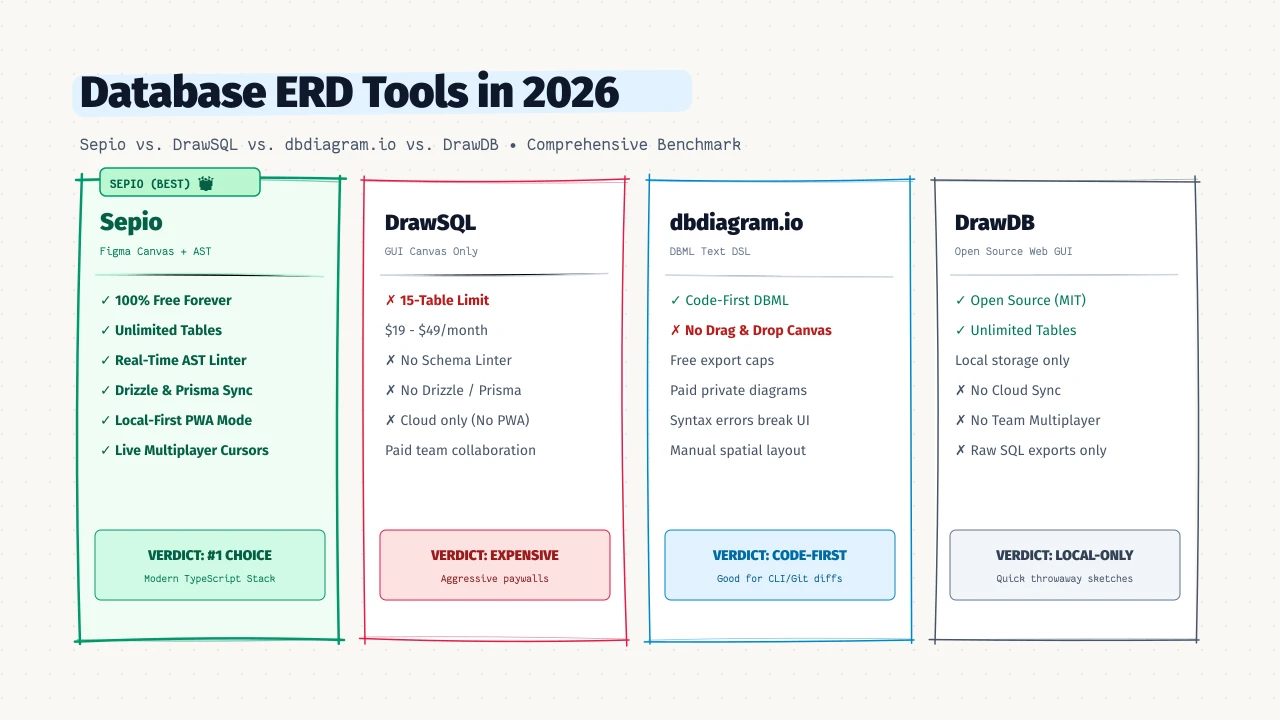
The Evolution of Database Schema Design
For years, database design lived in one of two extremes: heavy, clunky desktop database administration suites (like MySQL Workbench, pgAdmin, or JetBrains DataGrip) or generic whiteboard tools like Lucidchart and Miro that don’t know what a primary key is.
“A database diagram shouldn’t just be an artistic picture for slide decks. It should be an executable architectural contract that guarantees syntax validity and generates your schema code.” — Engineering Architecture Principle
Over the last few years, a new generation of developer-centric Entity-Relationship Diagram (ERD) tools has emerged. These tools live in the browser, understand real SQL constraints, and generate code directly from visual relationships.
Today, developers primarily evaluate four tools when planning database architectures: Sepio, DrawSQL, dbdiagram.io, and DrawDB.
In this guide, we break down how these platforms compare across canvas UX, schema safety, code generation, collaboration, and pricing to help you pick the right tool for your engineering stack.
Quick Comparison Matrix
| Feature | Sepio ERD | DrawSQL | dbdiagram.io | DrawDB |
|---|---|---|---|---|
| Canvas Workflow | Visual Drag & Drop | Visual Drag & Drop | Text-Only DSL (DBML) | Visual Drag & Drop |
| Real-Time Schema Linter | Built-in AST Engine | None | None | None |
| Drizzle ORM TypeScript Export | Native Two-Way AST | None | None | None |
| SQL & DBML Code Generation | Postgres, MySQL, SQLite | Postgres, MySQL, MSSQL | Postgres, MySQL, SQL Server | Postgres, MySQL, SQLite |
| Offline-First / PWA Support | 100% Local (IndexedDB) | Cloud Only | Cloud Only | Local Storage |
| Free Tier Table Limit | Unlimited Tables | Capped at 15 Tables | Unlimited (exports capped) | Unlimited |
| Multiplayer Collaboration | Live Cursors & Presence | Paid Plans Only | Paid Plans Only | None |
| Schema Migration Generator | Automated ALTER SQL | None | None | Basic SQL Diff |
| Database Introspection | Live URL & File Import | Raw SQL Import | SQL Import & CLI | Raw SQL Import |
1. Canvas UX: Visual Drag-and-Drop vs. Code DSL
The biggest divide in database diagramming tools is how you build your schema.
dbdiagram.io: The Text-First Pioneer
dbdiagram.io pioneered DBML (Database Markup Language), a declarative text syntax for modeling tables and relations:
Table users {
  id integer [pk]
  email varchar [unique]
  created_at timestamp
}

Table orders {
  id integer [pk]
  user_id integer [ref: > users.id]
}- Pros: Keyboard-driven, fast for developers who prefer typing code over dragging boxes, and version-controllable in Git repositories.
- Cons: There is no visual drag-and-drop editing. You cannot grab a column handle and drag a relationship line to another table. For team planning sessions or non-technical stakeholder reviews, text DSLs create friction.
DrawSQL, DrawDB, and Sepio: Visual-First Modeling
DrawSQL, DrawDB, and Sepio approach schema design with a Figma-inspired visual canvas:
- You click to create tables, drag columns directly to create foreign key relationships, and visually organize domain clusters with color-coded groups and sticky notes.
- Where Sepio innovates: Sepio bridges the visual and code paradigms. When you connect tables on the canvas, Sepio updates an underlying Abstract Syntax Tree (AST) in real time. You get the fluid visual feel of DrawSQL combined with instant bidirectional code generation.
2. Schema Safety: Real-Time AST Linting
Drawing pretty database diagrams is fun, but a diagram is useless if the underlying schema contains architectural flaws that break your production migrations.
The Competitors: Blind Diagramming
In DrawSQL, dbdiagram.io, and DrawDB, the canvas will happily let you draw a foreign key from a UUID column to an INT4 column without raising a peep. You can omit primary keys, create orphan foreign keys without indices, and violate database naming conventions without any warning until you run your migrations in production.
Sepio: The Built-in Schema Diagnostic Engine
Sepio is the only ERD tool that features a live AST linter running continuously in your browser:
- Foreign Key Type Mismatches: Instantly alerts you if a child table references a mismatched parent column type.
- Missing Primary Keys: Flags tables created without primary key constraints.
- Unindexed Foreign Keys: Identifies missing indexes on foreign key columns that could cause table scans and severe JOIN performance degradation.
- Naming Conventions: Enforces consistent casing across tables and columns (
snake_case,camelCase, orPascalCase). - PostgreSQL Reserved Words: Warns you before you name a column
user,order, orlimit.
3. ORM Code Generation: Beyond Legacy SQL DDL
Modern TypeScript backends don’t write raw SQL strings by hand—they build schemas using modern ORMs like Drizzle ORM or Prisma.
Legacy Tooling: SQL-First
- DrawSQL & dbdiagram.io focus heavily on generating raw PostgreSQL, MySQL, and Microsoft SQL Server
CREATE TABLEDDL scripts. While useful for raw DBAs, modern full-stack developers have to manually translate SQL definitions into their ORM schema files.
Sepio: First-Class Drizzle ORM & TypeScript AST
Sepio treats TypeScript and Drizzle ORM as first-class citizens alongside PostgreSQL, MySQL, SQLite, and Prisma:
- When you draw relationships in Sepio, it generates clean, type-safe Drizzle TypeScript code (
pgTable,mysqlTable,sqliteTable) with proper.references(() => ...)and cascade rules. - Bidirectional Parsing: You can paste your existing Drizzle TypeScript file directly into Sepio, and the canvas instantly reconstructs the visual diagram. When you make visual modifications, you can export updated TypeScript code right back into your repository.
// Instant production-ready Drizzle TypeScript exported from Sepio
import { pgTable, uuid, text, timestamp } from "drizzle-orm/pg-core";

export const users = pgTable("users", {
  id: uuid("id").primaryKey().defaultRandom(),
  email: text("email").notNull().unique(),
  createdAt: timestamp("created_at").defaultNow(),
});

export const orders = pgTable("orders", {
  id: uuid("id").primaryKey().defaultRandom(),
  userId: uuid("user_id").references(() => users.id, { onDelete: "cascade" }),
});
4. Privacy & Offline Capabilities: Local-First vs. Cloud-Locked
Where does your database schema metadata actually live? For enterprises, regulated industries, or solo developers working on planes, this is a non-negotiable question.
- DrawSQL and dbdiagram.io: Cloud-only architectures. You must create an account, log in, and transmit your database architecture over the internet. There is no offline mode.
- DrawDB: Offers local browser storage, but lacks multiplayer collaboration when you do want to share with a team.
- Sepio: Hybrid Local-First Architecture:
- Zero-Friction Local Mode: When you land on Sepio, you don’t even need an account. Your schemas are persisted locally in your browser using IndexedDB. It works 100% offline as a Progressive Web App (PWA). Your confidential database architecture never leaves your machine.
- Optional Cloud Multiplayer: When you’re ready to share with your team, you can sign in to enable real-time multiplayer with live cursor presence, conflict-free CRDT synchronization, and shareable web links.
5. Pricing: The 15-Table Paywall Trap
Pricing is often where developers experience the greatest frustration with legacy schema designers:
- DrawSQL: Free accounts are restricted to 15 tables per diagram. In real-world web applications (an e-commerce app with users, auth, products, orders, invoices, and audit logs), you quickly surpass 15 tables within the first hour of planning. Upgrading costs $19 to $49/month.
- dbdiagram.io: Offers free diagrams, but gates private diagrams, advanced PDF/PNG exports, and team collaboration behind a $9 to $25/month paid plan.
- DrawDB: Completely free and open-source, but lacks cloud synchronization and team collaboration features.
- Sepio: 100% Free with Unlimited Tables and Diagrams. Whether your schema has 5 tables or 500 tables, you get full canvas access, real-time AST linting, and multi-dialect code export without surprise paywalls or table caps.
Summary: Which Tool Should You Choose?
Choose dbdiagram.io if:
- You work strictly from keyboard shortcuts and hate dragging boxes with a mouse.
- You are already standardizing your internal documentation around the DBML text format.
Choose DrawSQL if:
- You already have an active enterprise subscription and only need raw SQL DDL exports.
- Your team does not require offline work, real-time schema linting, or Drizzle ORM generation.
Choose DrawDB if:
- You want a lightweight open-source visual tool for quick, throwaway SQL sketches and do not need team collaboration or AST validation.
Choose Sepio if:
- You want a modern, Figma-like visual canvas with direct drag-and-drop column relations.
- You want an AST schema linter that catches missing primary keys and foreign key type mismatches before they break migrations.
- You build with TypeScript, Drizzle ORM, Prisma, or PostgreSQL and want clean, production-ready code.
- You value local-first privacy with offline PWA support and no mandatory account sign-up.
- You don’t want to hit an arbitrary 15-table paywall in the middle of designing your application.
Frequently Asked Questions
Why does DrawSQL limit free diagrams to 15 tables?
DrawSQL’s business model is targeted at charging SaaS teams and freelance developers when their schemas grow beyond basic prototypes. Most real-world production schemas quickly reach 20–50 tables, forcing users onto a paid plan ($19–$49/month). Sepio does not impose table limits on either free or local tiers.
Can I import my existing DrawSQL or dbdiagram schemas into Sepio?
Yes! You can export your schema as SQL DDL or DBML from DrawSQL or dbdiagram.io, paste it directly into Sepio’s importer, and Sepio will immediately render the visual canvas with all relationships, primary keys, and types preserved.
Is dbdiagram’s DBML format an open standard?
DBML (Database Markup Language) is an open-source specification maintained by Holistics. Sepio has native, full bidirectional support for DBML, allowing you to import or export .dbml files freely while enjoying a visual drag-and-drop canvas.
Ready to start modeling? Launch the Sepio editor — no sign-up required.